OneShot’s fast travel is a custom system with a few components.
Fast traveling allows the player to instantly travel to another location within the same “zone” they’re currently in, and only to locations they’ve already visited.
Some places prevent the player from fast traveling, most notably “indoor” locations. The game itself has no concept of “indoors” or “outdoors”, it’s simply a function call on each map where you shouldn’t fast travel from. See Init Events for more information.
Fast Travel Destinations
To create a destination, you simply add an event called FAST TRAVEL to the map, calling a script:
unlock_map :ZONE, :IDENTIFIABLE_NAME, :FACING_DIRECTIONFor example, traveling to the first Barrens map looks like so:
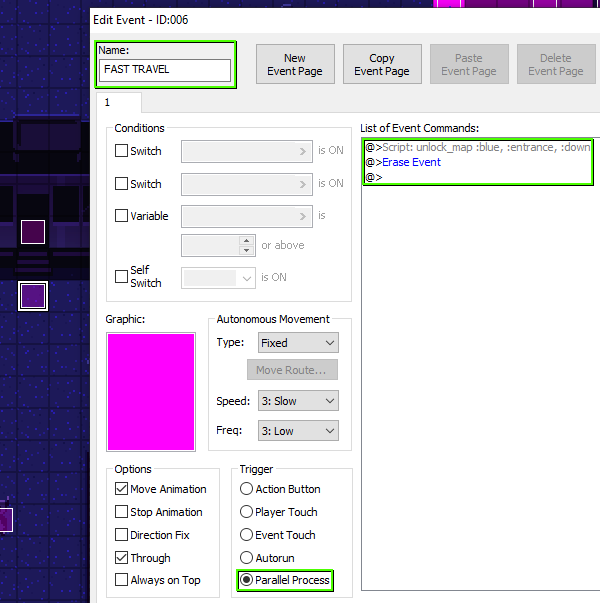
Fast traveling to this destination will then place the player where the event is.
Presentation
Now you must define the name of the zone, and the name of the destination, which is done in the Data_FastTravel script.
A short excerpt from the script:
ZONES = {
:blue => Zone.new(tr("The Barrens"), {
:entrance => tr("entrance"),
:outpost => tr("outpost"),
:cliffs => tr("cliffs"),
:mineshaft => tr("mineshaft entrance"),
:factory => tr("old factory"),
:dorms => tr("dormitories"),
:swamp => tr("shrimp swamp"),
:docks => tr("docks"),
:quarry => tr("lookout point"),
}),
:green => Zone.new(tr("The Glen"), {
:village => tr("village"),
:ruins => tr("ruins"),
:forest => tr("forest"),
:wall => tr("the gate"),
:dock => tr("dock"),
:courtyard => tr("courtyard"),
:research => tr("research station"),
:grave => tr("graveyard")
})
}First there’s the zone, where we say that :blue will display as The Barrens.
Under it, we have the destinations, which defines that :entrace will display as entrance.