As a mod maker, you should set up a separate save directory for your mod, instead of saving over vanilla files. Other than saving players who uninstalled the game from trouble, you’re also saving yourself the trouble of dealing with your mod loading a vanilla save.
The only case where you wouldn’t care about this, is when your mod is purely an asset swap. No new/changed maps, dialogue, functionality, or scripts. It’s your responsibility to ensure players don’t lose their data or run into trouble because of your mod. If you think your mod doesn’t need this, then ignore this page at your own risk.
Setup
Read Script Layer, as this requires a very simple script change.
Create a new script, and have it load before anything else.
Should look like this if you’re doing it through the editor:
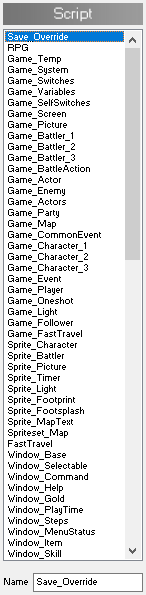
Copy this code into it:
# Set your mod's internal name here.
# Used primarily to set the save directory for your mod.
MOD_NAME = "CHANGE_ME"
# DO NOT MAKE CHANGES PAST THIS POINT.
# Or do, at your own risk.
# --------------------------------------------------
# Ensure the modder actually changed the name
if MOD_NAME == "CHANGE_ME" # I repeat: DO NOT CHANGE.
print("You did not set the mod's name.")
print("See the 'Save_Override' script for details.")
exit()
end
# Store vanilla save path in case someone might want to use it
Oneshot::VANILLA_SAVE_PATH = Oneshot::SAVE_PATH
# Override the `SAVE_PATH` constant, and ensure the directory exists
Oneshot::SAVE_PATH = "#{Oneshot::SAVE_PATH}/mod_#{MOD_NAME}"
Dir.mkdir(Oneshot::SAVE_PATH) unless File.exist?(Oneshot::SAVE_PATH)Then inside the script, change just the first CHANGE_ME to your mod’s name, and nothing else.
To avoid any potential issues, use only numbers, underscores, and lower case English characters.