Being able to execute another event on the same map by name has a lot of uses. Think of it like calling common events, but they’re tied to the map, can use self switches, and are executed when called instead of when the event ends.
Useful for when you have multiple events performing the same action, or chaining operations based on certain conditions.
But for me, it was crucial because I wanted readable, complex dialogue chains with a lot of conditions.
Calling events enables that by letting you split parts of a scene into events.
And example from the final dialogue in Frostide:
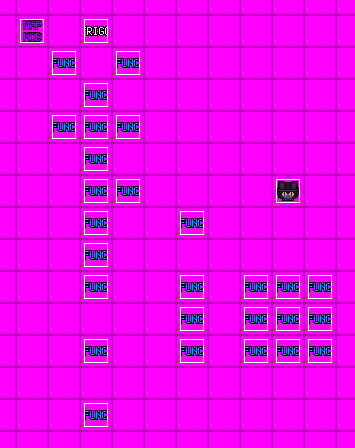
For reference, look at vanilla Prophetbot’s 4th page to see the normal approach.
Usage
Example scenario: > Multiple robots that should elect the same reaction from Silver when interacted with.
Create an event in an unreachable spot, and give it a meaningful name that’s unique to the map. For example,
silver_react. Add all the commands handling Silver’s reaction to pressing the buttons to it.Create an event that the player will interact with, and give it a script command with this line:
call_event("silver_react")You can create multiple copies of it, and they will all call the same event.
If you’d like to change Silver’s reaction, you only need to do it in silver_react, instead of all the buttons.
Lets throw in some conditional logic: > Silver’s reaction changes based on how many times you’ve interacted with the robots, regardless of which robots you’ve touched or what order.
The silver_react event is still an event, and follows regular event logic.
This means you can use pages with switches, self switches, or variables to change the result.
Simply have silver_react change one of these, and handle it as you would with any other event.
It doesn’t care who called it, so which robot you touch and when has no bearing on the outcome.
Lets complicate things further: > Silver may be absent from the room. > When she’s absent, each robot should play a different sound when touched.
The call_event function returns true or false depending on whether or not it succeeded in calling the event, and if the event had anything to execute.
This means you can use a conditional branch command to execute logic if the event is in a state where it has nothing to execute. It ignores comments, so you can, and are even encouraged, to leave notes for yourself indicating what that empty page meant.
- Set up a switch that determines whether Silver is in the room or not.
We’ll call it
Silver left room. - Have Silver’s event only appear when that switch is
OFF. - Add an empty page to the
silver_reactevent, that’s only active whenSilver left roomisON. - Change the buttons so that the script is in a conditional branch with an else statement:
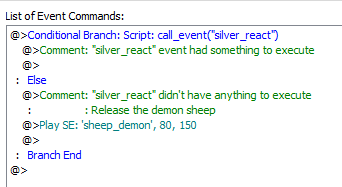
And just like that, most of the logic is handled by one event, without having to update multiple events should Silver’s reactions or the switch controlling her presence changes.
In the end, it should look something like this in editor:
And behave like this in game: