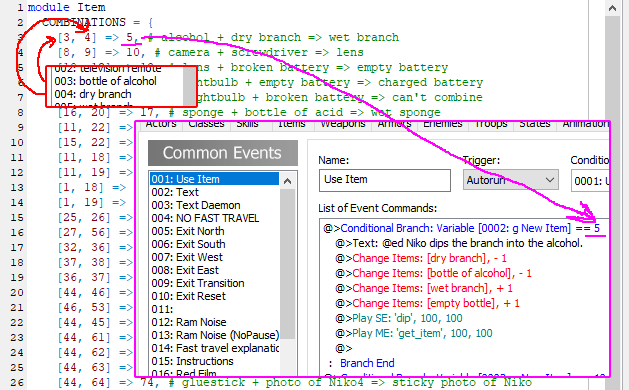
OneShot uses custom logic to make item combination possible. This requires editing a script file, and a common event.
Combination Definition
For the game to register a combination, it must be defined in the Data_Item script.
A short excerpt from said script:
module Item
COMBINATIONS = {
[3, 4] => 5,
[8, 9] => 10,
[10, 12] => 13,
}
endThe logic is simple: [item_id_1, item_id_2] => result_id
So in case of [ 3, 4 ] => 5, the game will have something happen when you combine the item with ID 3, and the item with ID 4.
In vanilla’s case, it’s alcohol with dry branch.
The order doesn’t matter, so you don’t need to include [ 4, 3 ] => 5 if the player tries combining them in a different order.
The result_id is a value that gets inserted into the [0002: g New Item] variable, which is then used in the result definition.
The variable is set to 0 when the player attempts an undefined combination.
I recommend leaving comments in the script indicating what are the associated items and result.
Result Definition
The 001: Use Item common event handles what happens after a combination was attempted.
Use the [0002: g New Item] variable that gets set after attempting to combine items.
It’s plain RPG Maker XP from here.