OneShot uses custom logic to emit footstep sounds. This requires editing a script file, and tilesets.
The Definition
Each tileset is assigned a set of footstep sound effects it can use in the Data_Footsteps script.
A short excerpt from said script:
FOOTSTEP_SFX = [
[
'step_wood',
'step_tile'
],
[
'step_gravel',
'step_wood'
],
[
'step_tile',
'step_wood',
'step_metal'
]
]
FOOTSTEP_AMT = {
'step_metal' => 4,
'step_tile' => 4
}First, it assigns wood and tile to the first tileset in the tileset list, gravel and wood to the second, then tile wood and metal to the third.
Notice that these names correspond to audio files in /Audio/SE, like /Audio/SE/step_wood.wav.
But some sounds have variations, like in case of step_metal, which has step_metal01.wav through step_metal04.wav.
You tell the system how many variations there are with the FOOTSTEP_AMT block at the bottom, which in the example says there are 4 variations of step_metal.
The Application
When editing a tileset in the editor, you may assign these sound effects to tiles via Terrain Tag.
The number on the tile corresponds to a sound effect defined in the previous part.
So in this case, every tile marked as 1 will play step_gravel, and every 2 will play step_wood:
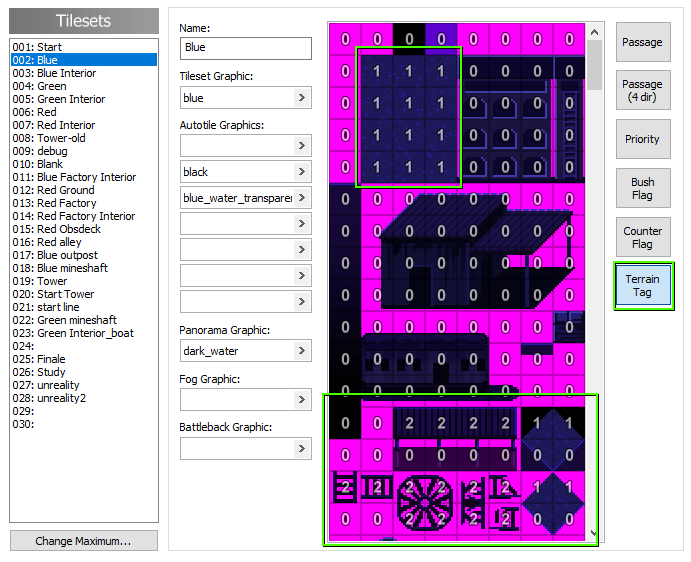
0 does not play a sound effect.
This is the default behavior.
Sadly you’re only limited to 7 footstep sounds in a tileset, because the editor’s Terrain Tag can only count up to 7.